
Most website owners track vanity metrics and miss what matters. Drop the noise and focus on the 10 KPIs that actually drive results.
Track organic traffic, rankings, CTR, conversions, backlinks, ROI, engagement, Core Web Vitals, domain authority and AI search visibility. That’s everything you need to measure SEO effectively.
SEO KPIs are the metrics you track to measure whether your SEO campaign is actually working.
The most important SEO KPIs are organic traffic, keyword rankings, AI visibility and conversion rates.

The right KPIs show you:
- What’s growing
- What’s broken
- Where to focus next
But most website owners and even SEOs set up Google Analytics, check their organic traffic numbers daily, and that’s it.
That’s like a doctor checking your temperature and calling it a full health check. It just doesn’t make sense.
If you want to improve your SEO consistently, you need to track the right KPIs.
Think of them like a GPS for your campaign. Without SEO KPIs, you’re just guessing where to go next.
That’s why we always tell our clients that SEO decisions should ONLY be data-driven.
With that in mind, I am going to show you exactly which SEO KPIs to track, what they mean and how to measure them accurately.

What Are SEO KPIs?
SEO KPIs stand for Search Engine Optimisation Key Performance Indicators.
These are actionable and practical metrics used to track the effectiveness of an SEO campaign.
The main word to remember here is “key”.
Not every metric qualifies. For example, your Google Analytics account tracks hundreds of metrics and data points.
But only a handful of them really matter.
Think about it like this…
For a metric to be a KPI, you need to be able to easily and clearly draw a straight line from that metric to an important business objective. If you can’t do that, it’s not a KPI.
Here’s a useful framework that we use to identify essential SEO KPIs:

Layer 1 - Visibility: Can people find you? (Rankings, impressions, AI citations - SEO team)
Layer 2 - Engagement: Do they click and stay? (CTR, engagement rate - Content team)
Layer 3 - Conversion: Do they take action? (Conversions, conversion rate - Marketing lead)
Layer 4 - Business Impact: Is it making money? (ROI, revenue - C-suite / leadership)
Simple, right?
From this framework, you can see exactly what KPIs lead to what business objectives and who should be in charge of them.
But here’s the most important advice I can give you…
Don’t track everything.
I’ve seen too many clients go down the rabbit hole of trying to track every little aspect of their SEO campaign. Don’t get caught in this trap.
SEO KPIs are the signal. They tell you what’s working and what isn’t.
Then you can dive deeper below the surface to see what’s going on.

Why Most SEO Reports Are A Waste Of Time
Most SEO reports are a waste of time because they focus on vanity metrics like impressions, individual keyword rankings, and raw traffic.
These metrics aren’t necessarily bad to look at, but they’re more noise than signal.
The average SEO report takes 2-4 hours to put together. And it's filled with metrics that don't actually tell you if your SEO is working.
They have pretty graphics, charts and tables. But they don’t give you any real information.
I’ve seen reports from agencies that are essentially spreadsheets full of data, like bounce rates, engaged sessions and keyword highlights – whatever that is.
All of this is just a distraction from your real goals. The truth is that you don’t need a lot of data.
If you’re serious about tracking your SEO campaign correctly, there are ONLY 10 real SEO KPIs you need to measure consistently.

The 10 SEO KPIs You Should Actually Track
Now you understand what SEO KPIs are and why they are important.
Below are the only 10 SEO KPIs you need to track and how to measure them accurately. Let’s start with the most famous one…


1. Organic Traffic
Organic traffic is the number of people who visit your site directly from a search engine like Google.
But organic traffic now includes visitors from AI search tools like Perplexity, ChatGPT and Gemini as well.
Think of it like a baseline metric that should underpin every campaign.
If your organic traffic is growing, your SEO is working. If it’s flat or dropping, this may be a signal that you need to address something in your campaign.
How do you track organic traffic?
There are two primary ways:
- Google Analytics 4 – All organic traffic, including from AI search
- Google Search Console – Clicks directly from Google search
Both are important because they give you different perspectives.
The best place to start is with Google Analytics.
Log in to Google Analytics, click Reports and then select Traffic Acquisition.

By default, this report shows you all the sources of traffic. Organic traffic is the traffic you get directly from search engines.
Track your organic traffic on a monthly basis. That way, you can spot trends over time and catch any drops before they become a real problem.
Pro Tip: Traffic from AI tools like ChatGPT, Perplexity and Gemini is often considered “referral traffic” by Google Analytics 4. Pay attention to this and make sure you include any traffic from those sources in your organic traffic number.
Next is Google Search Console.
Log in to Google Search Console, click on Performance and select the Pages tab.

Now you can see the number of clicks directly from Google to your site. It’s also easy to see exactly what pages are driving that traffic.
The key here is to cross-reference both data points from Google Search Console and Google Analytics.
Using GA and GSC gives you a complete picture of your organic traffic overall.
The truth is that you only do SEO to get more targeted traffic to your site. So it makes sense that organic traffic should be one of the essential metrics you pay attention to.

2. Keyword Rankings
Keyword rankings tell you exactly where your pages appear in Google’s search results for keywords you’re targeting.
For a long time, keyword rankings have been the gold standard SEO KPI.
Why?
The first result on Google gets 27.6% of all organic clicks.
The second result gets 15.8%.
The third result gets 11.0%.
The top 3 ranking positions get a combined 55% of all the clicks.
The 10th position gets just 2.4%.
Crazy, right?
That gap is enormous in terms of potential business revenue.
The bottom line is that your ranking position directly affects how much organic traffic you receive. And with the introduction of Google AI Overviews, if you’re not ranking in the top 3, you’re basically invisible.
What’s the best way to track keyword rankings?
There are two options:
- Google Search Console – Free
- Rank tracking tool – Paid
Google Search Console is a great way to track your keyword rankings because you can see your average ranking for individual keywords and how many clicks you’re actually getting.
Log in to Google Search Console, click on Performance and select the Queries tab.

Make sure you toggle on the Position box at the top to see your average ranking position. You can also adjust the dates to see rankings across different periods.
Google Search Console is a great free option for rank tracking. But it’s limited in data and in what you can accomplish.
That’s why I recommend using a premium tool as well.
The two tools I recommend the most are:
- Semrush
- AccuRanker
Semrush has accurate tracking, and you also get the benefit of their entire suite of tools.

AccuRanker is my favourite rank tracking tool overall, but it is better suited to larger businesses tracking a lot of keywords.

You can’t go wrong with either one.
Pro Tip: Your website’s rankings on mobile devices can be different from those on desktop devices. That’s why you need a rank tracking tool that allows you to track both.
Keyword rankings should be updated daily.
This allows you to track trends over a month and get a more accurate view.
3. Click-Through Rate (CTR)
Click-through rate is the percentage of people who see your page in the Google search results and actually click on your site.
Here’s the CTR formula:
CTR = (Clicks / Impressions) x 100
If 1,000 people see your page in Google and 100 of them click, your CTR is 10%.
Simple, right?
The higher your CTR, the better.
But here’s the thing:
Google AI Overviews have reduced clicks on Google by 35.4%. And only 4 out of 10 searches now result in a click to a website.
That means that CTR has never been more important to your site. It’s something that you should actively be improving.
How do you measure it?
The easiest way is with Google Search Console. It has a direct CTR metric you can use to track for your:
- Website
- Pages
- Individual keywords


You might be thinking – “I have a massive site with a lot of pages, how do I track CTR for each page?”
The short answer is you don’t. Here’s what to do instead…
Make a list of the top 10-15 pages that make you the most money for your business. Notice I didn’t say traffic.
Track the average CTR for each of these core pages each month. Over time, you’ll establish a baseline that allows you to improve the CTR for each page and individual keywords.
The five main factors that affect click-through rate are:
• Answering search intent
• Meta title
• Meta description
• Content freshness
• Structured data
If you notice that your rankings are high but CTR is low, usually updating or optimising one of those factors will make a significant difference.
Rankings get you in front of people. CTR directly influences how many of them actually get to your site. You need both working together to bring great results.
4. Organic Conversion Rate
Organic conversion rate is the percentage of organic visitors who take a desired action on your site.
That desired action could include:
- Buying a product
- Downloading a lead magnet
- Filling out a contact form
- Clicking the call now button
It depends entirely on your industry and business objectives.
Here’s the formula to measure organic conversion rate:
Conversion Rate = (Conversions / Organic Sessions) x 100
For example, if you have 2,000 monthly organic visitors and get 64 conversions, your conversion rate would be 3.2%.
Conversion rate is arguably one of the most important SEO KPIs. Traffic and rankings are one thing, but conversions are the end goal.
How do you track organic conversion rate?
The easiest way to do it is through Google Analytics 4. But unlike some of the other KPIs, this one doesn’t come set up straight out of the box when you install GA4 on your site.
That means you need to configure conversion events in your Google Analytics account.
Log in to Google Analytics 4, click Admin, select Events and choose Create Event.

Define the action that you want to track as an Key Event conversion. Then, head over to the Events tab and toggle on the stars next to the new event you just created.

Google will now start tracking that conversion event.
Wait some time for conversion actions to take place, and you can verify them in Google Analytics. Now it’s easy to see your conversion rate…
Click on Reports, then Acquisition, and select Traffic Acquisition.

You can see all the conversions you received from organic traffic specifically.
Conversion rate matters more now than it did just a few years ago.
Why?
As AI search has grown, organic traffic to sites has dropped. But even with less traffic, your conversion rates should remain strong.
They are an essential SEO KPI that shows you where your SEO strategy is working.
5. Backlinks And Referring Domains
Backlinks are hyperlinks from other websites to yours. Referring domains are the number of unique websites that link to your site.
If you have 3 links from the same domain, that would be:
- 3 backlinks
- 1 referring domain
Both are important to track.
Google looks at backlinks as votes of confidence. The more links you have from trusted domains, the more Google will trust your site.
More trust = higher ranks.
And it works the same way for AI search tools like ChatGPT, Perplexity and Gemini. These LLMs only want to cite trusted websites in their answers.
That’s why backlinks and referring domains are a must-track SEO KPI.
The easiest way to track backlinks is with an SEO tool like Semrush or Ahrefs. My preference is Ahrefs because they have a large backlink index, and it’s easy to use.
The good news is that you can actually track backlinks for free in Ahrefs.
Log in to Ahrefs, add your website, click on it and select the backlinks report.

Ahrefs will show you every link pointing to your site right now. You can do the same with the referring domains report.
Track both numbers on a monthly basis. You should track the total number of links you have and how many new links you acquire each month.
But not every link is worth tracking.
Link building is about quality over quantity. One link from a high-quality website is worth more to your SEO than 10 links from low-quality, spammy websites.
That means you shouldn’t count every link that Ahrefs reports.
Use these filters:
• Dofollow only
• Backlink type: In-content
• Minimum DR20

This will filter the report to show you backlinks that are actually boosting your SEO results and AI visibility. They’re the ones worth tracking.
Your backlink profile should naturally be growing over time. This is especially true if you’re outsourcing link building or actively building links yourself.
Want backlinks that increase rankings in Google and AI platforms?
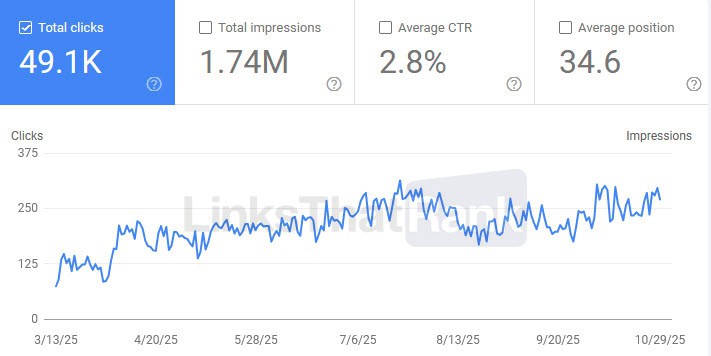
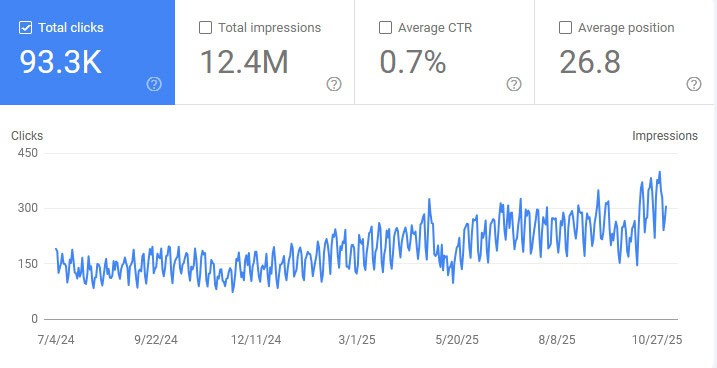
Get quality strategic guest post links and link inserts from LinksThatRank. Every link we build is built to the highest standards and passes our strict 23-point quality control process.
That’s how we’re able to deliver results like this for our clients:

Choose the links you need and tell us your target keywords – we’ll take care of the rest.
6. SEO ROI (Return On Investment)
SEO ROI measures the return you received in revenue compared to the amount you spent on SEO services and activities.
Here is the formula to calculate it:
SEO ROI (%) = (Revenue from SEO - Cost of SEO) / Cost of SEO x 100
For example, let’s say that you spent $25k and made $100k. The formula would look like this:
($100k SEO revenue - $25k SEO costs) / $25k SEO costs x 100 = 300%
SEO ROI is another essential KPI to track.
Traffic, rankings and backlinks are all important. But at the end of the day, ROI is the single most important KPI.
It helps you understand if your SEO is actually moving your business forward and allows you to make better budgeting decisions going forward.
To calculate SEO ROI accurately, you need to know two things:
- SEO costs: Agency fees, tools, content, link building
- SEO revenue: The amount of money you make directly from organic search traffic
For example, if you run an ecommerce platform, measuring SEO ROI is pretty straightforward. Most ecommerce platforms like Shopify automatically track your sales and the traffic source of those sales.
So it’s easy to track the revenue that comes directly from SEO.
But what if you are a local services company or B2B business?
That’s where it gets a bit trickier. You’ll need to track the leads SEO brings to your business and assign a lead value.
Let’s say you run a local services company. For every 4 leads you get, you close 1 of them. And the average revenue your business makes from a sale is $2,400.
The lead value calculation is:
$2,400 avg. sale / 4 leads to close one sale = $600 lead value
In other words, the average lead is worth $600 to your business. Now you can calculate your ROI.
Let’s say the local services business gets 15 leads each month from SEO. You simply multiply the 15 leads by the average $600 lead value to get your SEO revenue number of $9,000.
Now you can easily calculate your SEO ROI.
Cool, right?
Less than 25% of SEOs and business owners bother to calculate their SEO ROI. But ROI is the single most important KPI to track.
It might take some time to get used to it, but with some practice it quickly becomes second nature.
7. Engagement Rate
Google Analytics 4 has a metric called engaged sessions.
And it tells you more than you think.
Visits are counted as engaged sessions when they either:
• Last longer than 10 seconds
• Trigger at least one conversion event
• The user views two or more pages in one session
The engaged sessions metric replaced the old bounce rate metric in Universal Analytics. And it tells you way more about the quality of your content.
If someone lands on your page, stays for 5 seconds and leaves – that tells you that something is wrong.
The content doesn’t match what they’re looking for, they had a bad experience or the page just loaded too slowly.
Low engaged sessions signal that there is something wrong. Higher engaged sessions show that your site offers a good user experience and great content.
The reason this is so important is that Google also pays attention to this metric.
The higher your engagement rate, the higher you will rank. It’s a clear signal to Google that you’re satisfying the search intent and giving people what they came for.
But there is one thing most people don’t know…
There is no accurate universal benchmark for engagement rate. For some sites it might be 45%, for others it could be 65%. The most important thing is that it’s personalised.
That means you need to benchmark your own site.
Log in to Google Analytics 4 and look at the last 6 months of organic sessions on your site.

Record each month’s total sessions and engaged sessions.
Then use this formula:
(Engaged sessions / total sessions) x 100 = engagement rate
Let’s say you had 1,000 organic sessions and 550 engaged sessions. The engagement rate would be 55%.
Calculate the engagement rate for each of the last 6 months and take an average. Now you have a benchmark for what your engaged session rate should be.
Use this going forward.
If your engagement rate drops below your benchmark, that’s a signal to look deeper at individual pages and content.
Every 6 months, recalculate your engagement rate benchmark.
It keeps your benchmark accurate and your content quality where it needs to be.
8. Core Web Vitals
Core Web Vitals are a set of metrics that measure the speed and overall experience of your website.
Google uses them as ranking factors. That means if your site is slow, your rankings will suffer.
There are three Core Web Vitals:
- Largest Contentful Paint (LCP): Measures how long it takes for your main page content to load and should be under 2.5 seconds.
- Interaction to Next Paint (INP): Measures how quickly your page responds when a visitor clicks or taps something, and should be under 200 milliseconds.
- Cumulative Layout Shift (CLS): Measures how much your page jumps around while it is loading and should be under 0.1.
If your Core Web Vitals aren’t under those benchmarks, it could be affecting your rankings.
Google actively tracks your Core Web Vitals. When someone visits your site, Google records these metrics in real time. That’s why you can’t afford to ignore them.
The good news?
Google also shows you the results of those live tests inside Google Search Console.
Log in to Google Search Console and under Experience, click on Core Web Vitals.

Now you can see them for both your mobile and desktop sites. The mobile version is the most important because Google indexes the mobile version of your site first.
It’s the version that impacts your rankings most.
In most cases, if you take care of the mobile Core Web Vitals, the desktop will take care of itself.
So what should you actually be tracking?
Track the number of URLs for:
• Poor URLs
• URLs need improvement
• Good URLs
Add this to your tracking sheet and client reports. You’ll often find that all the URLs will be in one category.
For example, you might have all your pages in the “URLs need improvement” category.

That’s actually a good thing. It usually means it’s a sitewide issue.
Fixing that one issue can move them all into “Good URLs”. I recommend using Google PageSpeed Insights for diagnosing Core Web Vitals issues.
It tells you exactly what’s broken and how to fix it.
9. Domain Authority / Domain Rating
Domain Authority (DA) and Domain Rating (DR) are third-party metrics that measure the overall authority, trust and strength of your website.
They’re used to help determine what keywords you can target and your site’s strength relative to competitors.
DA was created by Moz and was the first metric most SEOs ever used. Domain Rating was created by Ahrefs and is now considered the best metric for measuring site authority by most SEOs.
Let me be clear:
Domain Authority and Domain Rating are not Google ranking factors. Google does not use them to rank your site or evaluate its authority.
But that doesn’t mean they’re not useful…
Think of them like a compass. They give you a quick way to measure your site authority, see what keywords you can realistically rank for, and see how you stack up against competitors.
And the best part? You can track both of them for free.
Use Ahrefs’ Website Authority Checker to check your DR.
Use Moz’s Domain Analysis tool to check your DA.
Here’s the important part:
You don’t need to track both authority metrics. Choose the one that you prefer and continuously track it.
Over time, you should see slow, consistent growth. Record the number each month and use it as a measurement of what keywords to target and content to create next.
How do you know if you have a good DA or DR?
This is the question I get all the time. The answer is that you need to see how you stack up against your competitors.
Take your top 5 SEO competitors and check their authority.
Look at the average and see if you are above or below.
The best way to increase your website’s authority is by building high-quality, relevant backlinks.
As your authority grows, your rankings, traffic, AI visibility and conversions will typically follow.
10. AI Search Visibility
AI Search Visibility measures how often your brand is recommended, cited or sourced on AI search tools like ChatGPT, Perplexity, Gemini and Google AI Overviews.
It’s calculated by dividing the number of times your brand appears in an AI-generated answer by the total number of prompts tracked.
AI search visibility is also one of the fastest-growing SEO KPIs on the list.
Here’s why:
ChatGPT now has over 1 billion weekly active users.
Google AI Overviews now reach over 2 billion users per month.
They’re not small numbers.
The trend is clear…
AI platforms are the next evolution of search, so measuring your visibility is only going to become more important.
The issue is that measuring AI visibility right now isn’t as straightforward as tracking Google rankings.
Unlike the Google SERPs, AI answers don’t give a list of 10 blue links that make it easy to measure rankings. Instead, they often only source 2-3 brands.
And our tests show that AI doesn’t always cite the same websites as sources, even when using the exact same prompt.
So, what’s the best way to track AI search visibility?
The easiest way is with an AI visibility tool like:
These tools allow you to track your AI visibility automatically and tell you exactly how often your brand is being cited.

You can even track individual prompts with Otterly.ai and Profound in the same way you would track keywords.

But the cool thing is that you can actually do this manually for free.
Here’s how:
Make a list of 10-15 common prompts that your target audience would type into an AI platform like ChatGPT.
Prompt searches on AI platforms tend to be longer, more specific and nuanced compared to keywords. The easiest thing to do is convert your current target keywords into prompt searches that your target audience would ask.
AI can help you with that.
Then, simply run the prompt in ChatGPT yourself.
Simple, right?
Do this at least 3 times per week, each month for each prompt.
Log two numbers:
- Mention Rate – How often your brand appears in the answer
- Citation Rate – How often a specific URL on your site is sourced
This will give you a clear monthly snapshot of whether your AI visibility is increasing. Once you have a base visibility rate, you can start actively optimising your site for AI search.
Over time, you’ll be able to see whether your AI search visibility is moving in the right direction.
Don’t sleep on tracking AI search visibility as an SEO KPI. By tracking this now you’re already ahead of most of your competitors. That gap is only going to get bigger.
Recommended Tool Stack For Tracking SEO KPIs
You don’t need a massive budget to track every KPI on this list.
Here’s the complete tool stack I recommend for tracking all 10 SEO KPIs accurately.
Free Tools (Essential):
• Google Search Console - Track average rankings, clicks, impressions, CTR, Core Web Vitals
• Google Analytics 4 - Measure organic traffic, conversions, engagement rate, AI referral traffic, SEO ROI
• Google PageSpeed Insights - Understand and improve website Core Web Vitals
• Backlink Blacklist  - LinksThatRank's free tool to check your backlinks against 60,000+ blacklisted domains
Paid Tools (Pick One):
• Ahrefs - Best backlink database and great Brand Radar for AI visibility
• Semrush - Comprehensive all-in-one SEO tool with a solid set of AI tools
AI Visibility (Emerging):
• Otterly AI - Purpose-built AI search visibility tool for monitoring brand mentions across 6 platforms
The best tool stack isn’t the most expensive one – it’s the one you’ll actually use consistently every month.
Don’t forget to check out the free Backlink Blacklist tool. It’s an essential part of your SEO workflow for identifying low-quality backlinks that could hurt your rankings.
3 KPI Mistakes That Waste Your Time
Tracking SEO KPIs is only valuable if you’re doing it correctly.
These are the three most common mistakes I see with SEOs and website owners right now that lead to wasted time.

Tracking Everything Instead Of What Matters
If you’re like me…You love data.
And the moment you start tracking KPIs, you start adding as many data points as possible.
But here’s the truth:
More data doesn’t equal better decisions. In fact, tracking too many data points and metrics is one of the fastest ways to lose track of what actually matters and ultimately slow your growth down.
Use the 10 SEO KPIs above and track them consistently.
They’re the only metrics you need to accurately measure the effectiveness of your SEO campaign.
Ignoring Context
Numbers without context are meaningless.
Let me explain:
Let’s say your organic traffic dropped 20% last month. Sounds bad, right?
But what if your business has seasonal demand? It makes sense that search volume would increase and decrease based on the season, which would naturally affect your organic traffic.
The context gives meaning to the KPIs. Before you panic over a drop or celebrate over a spike, ask yourself why it happened.
Cross-reference your KPI data with what’s happening in your niche, the SEO industry as a whole and any recent changes you’ve made to your site.
This will help you pull the right insights from your data and make smarter decisions.
Forgetting About AI Search
This is a big one right now…
At the moment, Google is still the largest organic traffic source of any traditional search engine or AI search platform. In fact, Google sends 345x more traffic than all other search engines combined.
But AI search is catching up. And generative engine optimisation (GEO) has become a legitimate and core part of SEO.
Prepare your site now for the future. Traditional SEO metrics don’t tell the whole story anymore.
Track your AI visibility regularly and actively implement GEO as part of your overall strategy.
Most of your competitors aren’t willing to adapt and that gap will only get bigger.
Wrapping It Up
SEO without data is just guessing.
KPIs are designed to help you understand the health of your SEO at a glance. This is just as true for website owners as it is for marketing agencies and their clients.
The 10 SEO KPIs are everything you need to:
- Measure your SEO campaign effectively
- Fix what’s broken
- Make better decisions
Remember:
You don’t need to track everything. You just need to track the right things consistently.
Start simple. Create a Google Sheet and list each of the 10 KPIs. Then record the data for each one every month.
Over time, that spreadsheet will become one of the most valuable documents in your business.
Need help with one of the most important pieces of the puzzle? LinksThatRank can handle your link building so you can focus on growing your business while your backlink KPIs climb in the right direction.

Ready to get started?
- Guest Posts – High-quality AI search-ready
- Link Building Packages – Discounted monthly bundles
- Link Inserts – Niche-relevant editorial placements
- Agency Program – Discounted white label services
Frequently Asked Questions
How many SEO KPIs should I track?
You should track a maximum of 10 SEO KPIs each month that directly align with your business goals. Any more than that and you’re likely recording too much data or tracking unnecessary information. The best approach is to track a mix of leading indicators (organic traffic, rankings, engagement rate) and lagging indicators (conversions, SEO ROI).
What’s the most important SEO KPI?
The most important SEO KPI is organic conversions. While metrics like traffic and rankings are important, they are ultimately vanity metrics. If you rank in the top 3 and get a lot of traffic that doesn’t ultimately convert, it’s not valuable to your business. Organic conversions are the ultimate SEO KPI that will actually allow you to see if your SEO is generating a return.
How often should I check my SEO KPIs?
How often you should check your SEO KPIs depends on the individual metric. Most SEO agencies and website owners do quick weekly checks for anomalies and more detailed reports on a monthly basis. Then, look at trends and set goals every 6 months. This will ensure you can catch issues early but also set long-term goals that drive business growth.
Do I need to track AI search visibility?
Yes, you need to track AI search visibility because traditional SEO KPIs no longer provide the whole picture of how your SEO is going. AI tools like ChatGPT, Perplexity and Gemini are changing the way people discover information and buy products/services. That means your SEO strategy and what you measure need to adapt.
What tools do I need to track SEO KPIs?
To track SEO KPIs effectively in 2026, you need a mix of foundational free tools and paid SEO tools. The essential foundational tools include Google Search Console, Google Analytics 4 and LinksThatRank Backlink Blacklist for organic traffic, CTRs, conversions, ROI, backlink quality and more. The premium paid tools can include Ahrefs, Semrush and Otterly.ai for link building, domain authority and AI search visibility.