
This guide breaks down the 8 metrics that actually tell the story – from referring domain growth and link quality scores to AI visibility and real business ROI. Track these, and you’ll know exactly which links are moving the needle.
Measuring a link building campaign comes down to tracking the right KPIs.
Metrics like referring domains, Domain Authority (DA) and referral traffic all help you understand the impact links have on your site.

Here’s the problem:
52.9% of SEO professionals struggle to measure their link building ROI. That's more than half the industry flying blind.
The problem isn’t link building itself.
Backlinks are a proven ranking factor in both traditional Google search AND AI platforms like Perplexity, ChatGPT and Gemini. The number one ranking position on Google has 3.8x more backlinks than positions 2-10.
Links are the difference.
The real problem?
Most people track the wrong things. They obsess over vanity metrics while ignoring the numbers that actually tell the story.
So, how do you measure whether your backlinks are working?
I’m going to show you 8 metrics that take the guesswork out of link building. These are the exact metrics we use to separate successful backlink campaigns from the ones that waste your budget.

Why Most People Measure Link Building Wrong
Here’s where most people get off track:
They get a report from their link building agency, skim through each link, check the DR scores and call it a day.
This tells you almost nothing about whether your links are actually working.
Only 38% of marketers prioritise page rankings as their top KPI for link building. And only 28% bother to measure revenue from organic visits.
Think about that for a second.
Only 3 out of 10 link builders draw the line between their link building campaign and real business revenue. The rest are just guessing.
Crazy, right?
The problem isn’t the number of links you build. It’s measuring the right metrics that help you make better decisions.
And that’s what the 8 metrics below do.

I’ve split them into two groups:
- Leading indicators (metrics 1 to 5) – Early signals of your link building campaign
- Lagging indicators (metrics 6 to 8) – The results that matter most to your business
Work through the full list so you get the complete picture.

1. Referring Domain Growth Rate
Referring domain growth rate is the number of new referring domains you acquire each month.
I’m not talking about “backlinks” here. I’m talking specifically about referring domains.
What’s the difference?
If you get a backlink from the same site twice, that would be 2 individual links from the 1 referring domain.
Here’s why this is important:
One link from 2 different websites is better than 10 links from the same site. That’s why measuring referring domain growth rate is more important than measuring single backlinks.
How much does it impact your rankings?
Studies show a 0.68 correlation between referring domains and higher rankings. That's one of the highest correlations of any SEO factor ever studied.
Crazy, right?
How To Track Referring Domains
You can track referring domains with any premium SEO tool.
My choice is Ahrefs because it’s easy to use and has the largest live backlink index of any tool right now.
Type in your site in Site Explorer and click search. Scroll down and click on the Backlink profile tab.

This graph shows you the net referring domain growth over time. It’s a good overview of your profile in general.
Want to dive deeper?
Select the Referring Domain report on the left and add the following filters:
• Dofollow
• Show history: Last year
• DR: From 20

This will show you all the referring domains that are actually driving your site rankings and AI visibility. You can change the history to see growth over your entire SEO campaign or even month to month.
What Is A Good Referring Domain Growth Rate?
A good referring domain growth rate is consistent, gradual and natural. There isn’t a single number that is universally considered “good”.
That said, most of our clients typically see anywhere from 5% to 15% each quarter. That means if they had just 100 referring domains in Q1, they would gain 5 to 15 new referring domains in Q2.
The thing to keep in mind is that your referring domains should be growing.
If you’re creating great content and building links each month, your referring domain growth rate should be consistent.
Most of our clients combine targeted link building with great content to ensure just that.
The result?
Their referring domains grow consistently month after month. Look at this client campaign for example:

The more we build for them, the more they also attract naturally. It’s a cycle that compounds over time.

2. Domain Rating / Domain Authority Lift
Domain Rating and Domain Authority aren’t Google ranking factors themselves.
But they are useful metrics for tracking the overall authority of your site and the strength of your backlink profile.
Why does that matter?
Put simply — the stronger your website authority, the easier it is to rank and the more high-value competitive keywords you can target.
Domain Authority (DA) is the original authority metric created by Moz. It uses around 40 different factors, including backlinks, to assess a website’s authority score.
Domain Rating (DR) was created by Ahrefs and is now considered to be one of the best authority metrics. 64.5% of all SEOs use DR as their go-to authority metric because of its reliability.
Both DR and DA use a 0-100 logarithmic scale. This basically means that jumping from 30 to 40 is far easier than going from 70 to 80.
The truth is that it doesn’t matter which authority metric you use. The most important thing is that you choose one and consistently track it.
How To Track Domain Rating
Tracking DR and DA works the same way. The only difference is the tools that you use.
My personal preference is Ahrefs Domain Rating because we’ve found it to be the most accurate for clients.
Create a free Ahrefs account and add your site. Ahrefs will immediately show your domain rating history over time.

Don’t panic if you see your DR fluctuating by a few points week to week. All authority metrics can be volatile in the short term.
Focus on long-term consistent growth.
What’s Considered A Good Authority Score?
A good domain rating and domain authority are impacted by your industry and competition. What’s good in one industry might be low in another.
That means there is no universal “good” score that works for every site.
But there are some general scores you can use.
Domain Rating:
• Low = Less than DR 20
• Average = DR 20 to 35
• Good = DR 35 to 50
• Excellent = DR 50+

Domain Authority:
• Low = Less than DA 30
• Average = DA 30 to 50
• Good = DA 50 to 60
• Excellent = DA 60+
Don’t focus too much on general authority scores. Instead, track your own website domain rating over time and track your key SEO competitors as well.
This is what matters most.

3. Organic Traffic and Keyword Rankings
This is where your link building campaign starts translating into real results.
Here’s the truth:
Links don’t exist in a vacuum. Every link you build should have one goal…
Increase your page rankings in Google and drive more targeted traffic to your site.
Simple, right?
That’s why tracking keyword rankings is non-negotiable. Remember that Google is still the number one traffic driver online and drives 345x more traffic than all the other search engines combined (including AI search tools).
But here’s where most people get it wrong…
They track their sitewide rankings and organic traffic. While tracking sitewide rankings is fine, you should be primarily focused on individual pages you’re actively building links to.
That’s the only real way to know if the links are actually moving the needle.
How To Track Rankings And Organic Traffic
There are two ways to track rankings:
• Google Search Console - Free
• Rank Tracking Tool - Paid
I recommend both.
My favourite paid ranking tracking tools are AccuRanker and Semrush. Both are accurate and provide reliable daily updates on your keyword rankings.
Google Search Console is a must because it’s free to use and gives you very granular insights on individual pages and even keywords.
What about traffic?
The best tool to track organic traffic is still Google Analytics. But you need to filter traffic so you can accurately measure organic traffic alone.
Log in to Google Analytics, click on Engagement, and select the Pages and screen report.

Make sure that you’ve selected the page path and screen class filter.
Now select the customise pencil icon in the top right, and apply the following conditions:
• Dimension: session medium
• Match type: exactly matches
• Value: organic

Now you can see exactly how much organic traffic each page on your site gets.
Cool, right?
Save this report in your account to refer back to it anytime.
How To Measure The Impact Of Your Backlinks
Backlinks do impact your overall site authority, which directly impacts sitewide rankings.
But to measure the impact of your links accurately, you need to directly track individual page rankings and traffic.
At the end of the day, you’re building links to specific pages because those pages increase business growth.
List every page you’re currently actively building links to and their primary target keywords.
Record each of them in a spreadsheet with the following:
• URL
• Target keyword
• Number of links built
• Current rankings
• Organic traffic
Record data monthly to establish a reliable timeline.
It typically takes 6-12 weeks for you to start seeing the impact on rankings. That means each quarter you should have enough data to see a clear pattern emerging.
If your links are working, you’ll see consistent jumps over time.
Simple, right?
The most important thing is that you record the data in a spreadsheet each month.
This will tell you whether your links are working and even help you identify which link types are driving the best results.
That’s exactly what you want.

4. AI Search Visibility and Brand Mention Rate
AI visibility is like the new kid on the block.
The truth is that most link builders aren’t tracking this metric yet. But they should be…
AI tools like ChatGPT, Perplexity, Gemini, Claude and Google AI Overviews don’t just pull answers out of thin air. They draw their answers from high-ranking, authoritative content.
Every time your brand gets cited as an AI answer source or recommended by an LLM, you get visibility.
38% of people use AI regularly for searching online, and 37% of consumers start a search with an LLM instead of Google.

Your link building now has a second job:
Getting your site regularly cited in AI search tools and LLMs.
But tracking AI visibility requires a deliberate process that most site owners (and even agencies) haven’t figured out yet.
That’s exactly what I am going to show you.
How To Track AI Visibility
Just as people use keywords to search on Google, they also use “prompts” to search in LLMs.
The difference is that AI searches tend to be longer, more specific and conversational. But people in the same target audience typically ask the same types of questions.
That means just like keywords, you can identify common high-value prompts and track them to measure your AI visibility.
Cool, right?
Start by building a list of 10-15 prompts your audience would regularly type into an AI tool.
The best thing to do is take your target SEO keywords for each page you’re building links to and use ChatGPT to show you the conversational prompt version.
Type this prompt into ChatGPT:
“I am setting up AI visibility and prompt tracking. Act as a [target audience]. Convert these SEO keywords into natural, conversational questions you would ask an AI assistant like ChatGPT or Gemini: [Keyword List]”
This is the response:

Now you have a complete list of high-value prompts worth tracking.
How do you measure your visibility?
Run these prompts manually in ChatGPT, Perplexity and Gemini each month. You should also search them in an incognito tab on Google, looking specifically at Google AI Overviews.
That way, you’re tracking your visibility in the top four AI search tools at the moment.
For each prompt, log two numbers:
• Mention Rate - How often your brand appears in the answer
• Citation Rate - How often a specific URL on your site is sourced

This will give you a clear monthly snapshot of whether your link building is improving AI visibility.
Want to automate the process?
Use a premium AI visibility tool like:
- Semrush
- Ahrefs
- Otterly.ai
- Profound
These tools will do all of the heavy lifting for you so you can focus on your SEO and link building.
AI visibility is only going to become more important. But most business owners aren’t even thinking about AI SEO at the moment. By tracking it now, you’re already ahead of most of your competitors — and that gap is only going to get bigger.
What Does Good Look Like For AI Visibility?
A good AI visibility score is a 70% mention rate or above.
That means when you run prompts, you appear at least every 7 out of 10 searches. A dominant AI visibility score would be an 85% or above mention rate.
Keep in mind that 76% of all sources cited in Google AI Overviews rank in the top 10 search results on Google. And it’s often similar for other AI tools like ChatGPT, Perplexity and Gemini.
That means if you’re ranking in the top 10 on Google but not getting mentioned in AI answers, your content needs work.
Optimise your content for AI by:
• Adding relevant FAQs
• Answering questions directly
• Providing clear definitions
• Making your content easy to summarise
• Demonstrating real-world experience
• Making claims easily verifiable
• Using original data, examples and insights
It’s often as simple as tweaking a few sections of the content that can make the difference.
Pro Tip: If your competitor appears in an AI answer but you don’t, treat it like a content authority gap. Improve your page so it answers the topic clearly and directly. Then build 2-3 relevant guest post links that cover that topic specifically and reference that question with a link back to your target URL. Do both, and you’ll close the gap faster than you think.
5. Referral Traffic and Conversions
Quality links don’t just pass authority…
They send referral traffic.
Look at this client’s Google Analytics report over the last 30 days:

Referral traffic was the 5th biggest source of traffic overall, making up 5.57% of the client’s monthly traffic.
Not bad for links you were going to build anyway, right?
The referral traffic also had high engagement rates and high average on-site times compared to all the other traffic sources.
This is a great sign that backlinks are driving qualified traffic to the site.
The bottom line is that you should be measuring referral traffic on a regular basis. It tells you if your links are relevant to your site and whether they’re driving real value outside of just passing authority.
That’s what quality backlinks do.
How To Track Referral Traffic
Tracking referral traffic in Google Analytics is easy.
Log in to Google Analytics, click Reports on the left, select Acquisition and choose the Traffic Acquisition report.

Here you’ll see all of your traffic acquisition channels, including referral traffic.
What about conversions?
You’ll need to set up conversion tracking in Google Analytics for things like leads, sales and other conversion goals. Then you can use the same report to see if that referral traffic is actually converting.
What To Look For With Backlink Referral Traffic
Not every backlink you build will send referral traffic, and that’s totally normal.
Guest post links in particular tend not to send a lot of referral traffic. But the ones that do drive traffic are your highest-value placements.
We know from the Google search algorithm leak that Google actively tracks referral traffic from links to understand relevance and quality. So if your backlinks are sending traffic, they’re likely boosting your rankings as well.
Each month, look at which referring domains are driving the most traffic.
Use referral traffic as a filter. The domains sending real traffic are telling you exactly where to focus your link building budget.
All you have to do is prioritise getting more links from similar domains.
6. Link Quality Score
Counting links is easy.
Measuring quality is a lot harder.
Every SEO guru will tell you to “just build quality backlinks”. But ask them to define quality and you’ll get a different answer every time.
How do we do it?
Rather than providing a dozen individual metrics to try to assess quality, we use a composite quality score. Think of it like a framework that helps you quantify the quality of each link.
Once you get used to the process, it takes less than 2 minutes to evaluate each link accurately.
How To Assess Link Quality
There are four primary factors that make up link quality:

• Authority
• Relevance
• Traffic
• Placement
Each of these factors plays an essential role in the effectiveness of your links.
Score each link you build with a 1 to 5 based on the four factors. Let’s go through them quickly.
Authority
Authority is the domain rating of the linking website:
• Less than DR 10 = 1
• DR 10 to 19 = 2
• DR 20 to 34 = 3
• DR 35 to 49 = 4
• DR 50+ = 5
Think of domain rating as the power component of each link.
Relevance
Relevance is more subjective.
But if the linking site:
- Is in the same niche/industry
- Regularly covers topics similar to your site
- Links from content relevant to your site
That backlink is highly relevant — you would score a 4 or 5.
But if the link comes from a site that isn’t relevant and doesn’t cover similar niche topics, you would score it a 1. A relevance score of 2 or 3 is for sites that are general in nature and cover a wide range of topics.
Keep it simple. The more links you evaluate, the easier it will become.
Organic Traffic
Organic traffic is proof that Google trusts a site.
If the site has a good amount of monthly organic traffic from Google, you can be confident that Google trusts it. That’s essential for link building.
Here’s how to evaluate monthly organic traffic:
• 0 to 99 = 1
• 100 to 199 = 2
• 200 to 299 = 3
• 300 to 499 = 4
• 500+ = 5
Easy, right?
Use Semrush or Ahrefs to find the website’s organic monthly traffic. Then assign it a number based on the amount.
Placement
Where is the link placed?
If it’s in the body of the content, it’s generally a 4 or 5.
But if the link is placed in the footer or the sidebar, you can give that link a 1. If the link is placed in the author bio, you might be able to bump it up to a 2.
Here’s a simple rule to keep in mind…
You should never build links that aren’t placed in the content body. Period. Google and AI search tools discount links from almost every other part of the page.
How To Use The Link Quality Score Framework
Now you have the four-factor framework to evaluate every link you acquire.
This is how to use it…
Combine the scores from each factor to get your total link quality score. The highest possible score is 20.
Here’s what totals mean:
• 12 or under: Low quality/spammy
• 13-16: Medium quality
• 17+: High-quality links

Here’s the truth:
Each link you build should be in the 18+ high-quality range.
Quality score is the single most important factor of any backlink.
That’s why every link we build for clients is manually reviewed by a member of our team and passes our strict 23-point quality control process. We don’t build links that don’t pass, no exceptions.
And the results speak for themselves:

Want proven backlinks that actually move the needle? Let us build them for you.
7. Link Retention Rate
Link retention rate is the amount of time that a backlink stays live.
For example, if you build a link and it stays live for 24 months, your link retention rate would be 24 months.
Not so complicated, right?
The problem is that most people don’t track link retention rate. And with the right tools in place, it takes just a few minutes per month to do.
How To Track Link Retention Rate
Link retention rate is calculated with the following formula:
Link Retention Rate = (Links Remaining / Total Links Built) x 100
The easiest way to track link retention is with Ahrefs.
Log in to Ahrefs, click on your site, select the backlinks report and click on the Lost links filter. Select Show history: Last Month.

This will only show you backlinks you’ve lost over the last month. It takes just a couple of minutes to scan through the links and identify high-value links that have dropped off.
Lost some links?
Quickly reach out to the site owner, let them know about the link and ask if they’ll place it back. Most links are simply lost due to a content update or a page restructure.
They’re not intentional.
Want to put this on autopilot?
Create an automated alert in Ahrefs for every time you lose a high-value link. That way, you can recover the link quickly.
What Is Considered A Good Link Retention Rate

A good link retention rate is 85% or above.
Below 85%, and you need to do some investigation.
Keep in mind that 17% of links disappear within the year. That means almost 1 in 5 links you build will just drop off if you’re not paying attention.
That’s why at LinksThatRank, we only build permanent dofollow backlinks backed by our 12-month link guarantee. If your link is removed for any reason within that period, we will replace it for free.
8. Link Building Campaign ROI
The gold standard of measuring any link building campaign is return on investment (ROI).
It’s also one of the hardest to track accurately.
Only 28% of SEOs and business owners track their link building ROI. That means almost 3 out of 4 people are flying blind.
Don’t be one of them.
You can and should measure your link building ROI. It will help you make better business and link budget decisions.
Link Building ROI Formula
Use this formula to measure your link building ROI:
(Traffic Value / Total Linking Root Domains) x 24 months = Lifetime Link Value
The link building ROI formula is designed to calculate the value of each individual link for any page on your site.
Here’s what each part of the formula means:
- Traffic Value – Cost of your current organic traffic if you had to buy it through Google Ads.
- Total Linking Root Domains – The number of total unique websites linking to your page.
- 24 Months – Estimated time the average backlink passes link equity, although it can be much longer.
Feel free to change out the 24 months with your own retention rate number.

Why lifetime link value?
Short answer — it tells you exactly how much revenue each link you build is worth to your business.
Then, if you make more money from a link than it costs you to acquire, you have positive link ROI.
Here’s how it looks in practice…
Let’s say your page has:
• Organic traffic value of $4,000/month
• 51 linking root domains
The calculation looks like this:
($4,000 / 51) x 24 = $1,882 Lifetime Link Value
That means that if you can acquire a quality backlink for that page for less than $1,882, you have a positive ROI.
How big is the ROI?
Simple — just divide your lifetime link value by your average link cost. Let’s assume the average link cost is $250.
The math would look like this:
$1,882 Lifetime Link Value / $250 Cost Per Link = $7.52

In other words, for every $1 you invest in link building on that page, you get $7.52 back in revenue.
Who wouldn’t make that trade?
But here’s where it gets more interesting…
You can apply this exact formula to your competitors using Ahrefs or Semrush to estimate their traffic value. That means before you even build your first link, you can calculate how many links you need to rank and your potential ROI.
Good business decisions are made based on data.
Smart link builders estimate their ROI on a link building campaign before they even order the first link. It’s the most important calculation you’ll make.
Pro Tip: Calculate the ROI of your link building campaign every 3-6 months. Data shows it can take up to 12 weeks for a link to have a full impact on your site ranking and AI visibility. Don’t get caught in the trap of trying to calculate your ROI too early.
Recommended Tool Stack
You don’t need every link building tool on the market. But there are a few that will help you measure your link building campaigns more effectively.
Here are the tools we use and recommend.
Backlink Analysis and Monitoring:
• Ahrefs - The best tool for backlink data, including tracking referring domains, Domain Rating, lost links and link quality metrics
• Semrush - Strong alternative to Ahrefs with a built-in toxicity scoring system
• Otterly.ai - The best tool to track AI visibility and individual prompts, with affordable pricing for the entry-level plan

Traffic and Conversion Tracking:
• Google Search Console - A must-have free tool from Google that shows you backlinks, rankings and click data
• Google Analytics - Free website analytics tool that will show you referral traffic, conversions and revenue attribution

Link Quality Verification:
• Backlink Blacklist - Free tool to check links against known PBN and low-quality site databases
The most important thing is that you track your results. The right tools combined with the right metrics are how you turn a link building campaign from guesswork into a measurable growth engine.
Wrapping It Up
Most people don’t take the time to measure link building correctly.
They chase vanity metrics, skim agency reports and hope for the best.
Relying on the hope strategy isn’t a strategy.
The 8 metrics above give you a complete picture of your link building campaign in detail. They allow you to track everything from the quality of links you’re building through to the real business ROI.

Here’s what I recommend…
Create a simple spreadsheet that allows you to track each of these metrics easily. Then, every quarter, calculate your link building ROI.
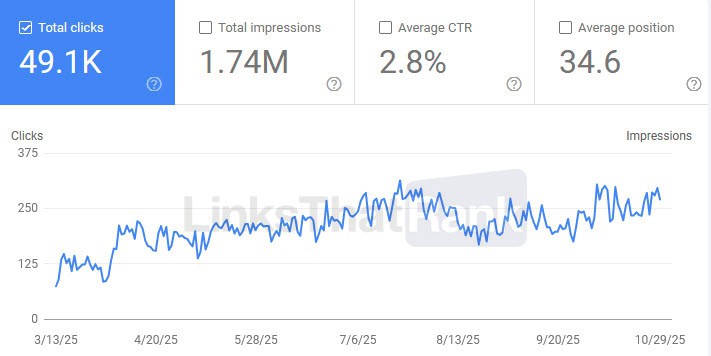
Example 1:
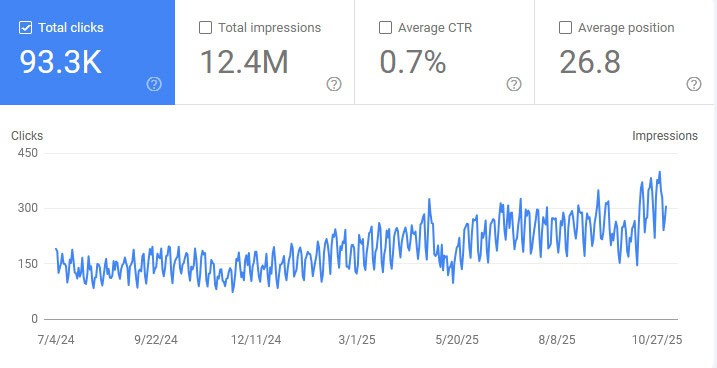
Example 2:
After a few months, you’ll start to understand exactly how much impact your links are having on your business and the types of links that are actually driving results.
Want quality backlinks without all the hassle?
Let our specialised team at LinksThatRank build them for you. Just tell us your target keyword and URL, and we’ll take care of the rest.
Ready to get started?
- Guest Posts – High-quality AI search-ready
- Link Building Packages – Discounted monthly bundles
- Link Inserts – Niche-relevant editorial placements
- Agency Program – Discounted white label services
Place an order now and see the difference that quality makes.
Frequently Asked Questions
How long should I wait before measuring link building results?
It’s recommended to do 3-6 months of consistent link building before you measure results. Most SEOs and businesses start to see the impact of link building within 6 to 12 weeks. 90% of our clients see a big increase in results within 6 months of consistent link building.
What is the single most important link building metric?
For SEO performance, referring domain growth rate and link quality score are the strongest leading indicators. But for business justification, link building campaign ROI is what matters most. Tracking all link building metrics is the best way to understand how your campaign is performing.
How do I measure link building success for AI search visibility?
Create a list of 10-15 prompts your target audience uses in AI tools to find information on pages you’re currently building links to. Run the prompts monthly in ChatGPT, Perplexity, Gemini and Google AI Overviews. Track your mention rate and citation rate each time you run the prompts. A mention rate above 70% is considered a good AI visibility score.
What’s a good cost per backlink?
The average quality backlink costs between $200-$500. High-authority editorial placements can cost as much as $1,000-$1,500+ per link. The average premium guest post link through a trusted link building service is about $250 per link. If you’re paying less than $100 per link, you should tread carefully to ensure you’re actually getting a quality link.
How many backlinks do I need per month?
The number of backlinks you need each month depends on your business goals, target keywords, industry and the level of competition. Generally speaking, smaller sites in less competitive niches need about 3-7 backlinks per month. Medium-level competition niches require 10-20 links, with high-level competition niches often needing 20 to 35+ links per month to be competitive.